Why my blog doesn't save articles in a database
Once I decided to start the blog, I had to begin building it.
Paper, pen, E/R diagram. The rush you get when you think: I’ll build it myself. The temptation we developers all feel, at least a little.
It’s the classic project that looks like a weekend job. Then you get into the heart of the design and in come editor, slugs, versioning, preview, SEO, sitemap, RSS, image management, search.
And the effort becomes more than I could really dedicate to it.
General rule, for me: don’t write a line of code until the design is finished.
The obvious choice seemed to be WordPress. It’s probably the most mature CMS out there.
But that means ad hoc releases, staying on top of updates and security patches, both for the core and for plugin management and a custom theme.
On top of that, there’s still a database to manage: right from installation, WordPress ships with a database that’s anything but empty.
And I didn’t want an editorial project. I wanted a simple blog with a few articles a year, all published by me — not the average user who needs all the advantages WordPress offers for free.
So I ruled out a database from the very start. Articles are markdown files. They’re version-controlled, easy to move, and don’t depend on a database.
For articles that change little once written, it’s the right solution. Zero queries, content already built ahead of time: instant loading.
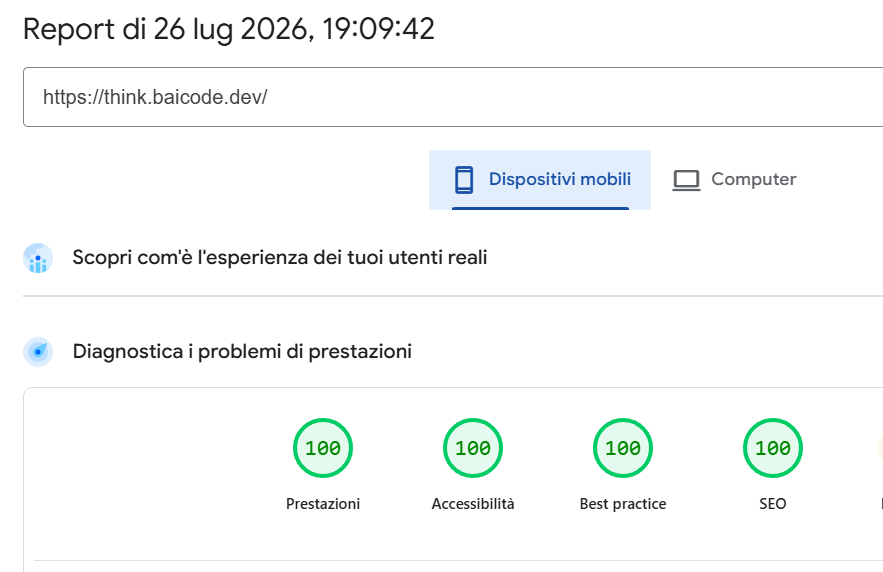
One of the points that pushes Core Web Vitals metrics to the max.
My first instinct, with content in markdown, was to look for a flat-file CMS with a dashboard: sticking with PHP there’s Grav, modern and highly customizable on top of Twig and Symfony; or Pico, even more minimal — no admin panel, you edit files directly, great for a documentation site or a very small project.
But an admin panel, for a single technical author who writes a few articles a year and already knows git, is a cost — not an advantage. If I’m the only “user” of the CMS, and I’m fine opening an editor instead of a browser, the panel becomes superfluous.
Once the dashboard constraint was out of the way, the path opened up toward static site generators. Content in git, a build that produces HTML, deploy of static files: nothing to run, nothing to patch.
I evaluated Astro: content collections validate the frontmatter against a schema already at build time, something a pure flat-file CMS lacks. But every build still requires a Node toolchain — node_modules, updates, a surface for breaking changes. A recurring, certain cost, for a one-off benefit that can also be achieved another way, for example with a check in CI.
I also evaluated Statamic in static export mode: a stack I know well, being Laravel, but the build toolchain is still a full Laravel application — PHP, Composer, framework updates to keep up with. The same trade-off as Astro, made worse by the fact that its strongest point, the admin panel, is exactly what I’d already ruled out.
The solution I found instead is Hugo.
A single Go binary: no Node dependency to maintain, no npm install before every build. Multilingual support is native, not a plugin or a convention to follow by hand — and for me, writing in Italian and English, that’s a requirement, not a nicety. RSS and sitemap per language come ready out of the box, with no ad hoc configuration. Syntax highlighting (Chroma) is included in core.
I also chose not to use third-party themes: many Hugo themes bring their own Node/PostCSS toolchain for styling, reintroducing exactly what I wanted to avoid by choosing Hugo. The layout is custom and minimal — home, post list, single article, tag page — little code for a blog with few views. Same logic for the CSS: handwritten, no Tailwind, because for 3-4 templates the benefit of utility classes doesn’t justify one more Node toolchain. Minification in production uses Hugo’s native pipeline.
In practice, in one weekend I released my blog, customized and with a build that’s reproducible anywhere: updating the toolchain, in the future, will just mean swapping an executable.
As developers we often have the instinct to build everything from scratch. But writing code isn’t always the best choice — sometimes not even installing one with a control panel is, if I’m the only one who’ll ever open that panel.
Sometimes, the best decision is to reduce the moving parts.
The decision in brief
Problem: where to publish the site’s articles, and what tool to generate them with.
Alternatives considered: custom development, WordPress, flat-file CMS with dashboard (Grav/Pico), Astro, Statamic (static export), Hugo.
Decision: Hugo.
Why: no toolchain to maintain between one publication and the next, native i18n/RSS/sitemap, minimal dependency surface.
Trade-off: no frontmatter schema validation at build time; a learning curve for Go templating; no upstream theme to receive fixes from — all HTML and CSS maintenance stays on the repo.
Technical deep dive: ADR-001 (flat-file content) + ADR-002 (Hugo as generator) + Git tag v0.1-blog.